Configuring inventory & inactivity
Inventory keeps your Power Platform estate up to date. Inactivity monitoring identifies unused artifacts and initiates notifications or cleanup actions.
Inventory settings
Inventory runs automatically and requires no manual configuration beyond enabling it per environment (see Configuring Environments for more details).
Inventory covers:
- Power Apps
- Cloud flows
- Desktop flows
- Bots
- Power Pages (upcoming)
- Custom Connector (upcoming)
- Environment metadata
Each sync updates:
- Ownership
- Compliance status
- Activity status
- Sharing information
- Basic metadata
Inactivity monitoring
When enabled for an environment, Impliancy:
- Tracks last activity of each artifact
- Flags items exceeding your inactivity threshold
- Sends inactivity reminders to owners and deputies
Threshold
Configured as a number of days since last modification or run.
Post reminder actions
Admins can choose:
- Do nothing (inform only)
- Auto delete after X additional days
Use auto deletion only when aligned with internal governance policies.
How to configure Inactivity Reminder & Auto Delete
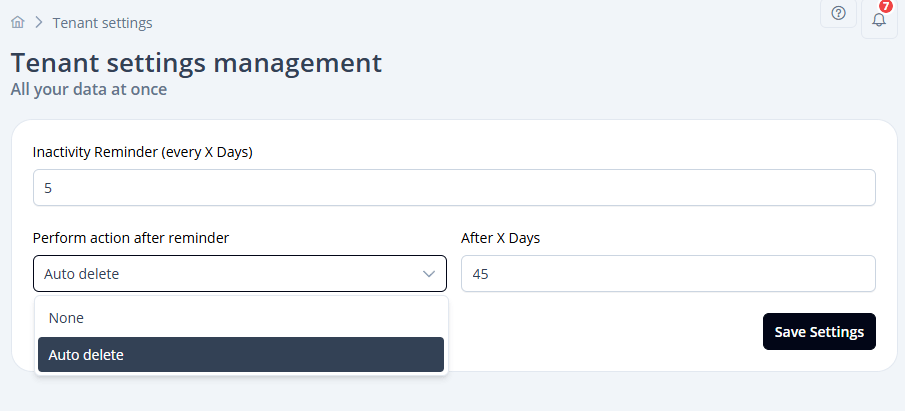
As an Impliancy Admin, click on Tenant Settings in the navigation. Here, you can set after how many days an inactivity reminder email will be sent to owners/deputies.
Additionally, you can perform an action after the reminder. For example, you could leave it as None so besides the reminder nothing will happen, or you could set it to Auto delete and then define the After X Days for Impliancy to automatically delete an artifact after the defined period.
Recommended settings
- PROD: inactivity ON with reminder-only with auto cleanup
- DEV: inactivity OFF