Managing admins
Impliancy uses a simple and secure model to determine who has administrative access.
This ensures that governance tasks can only be performed by the appropriate roles within each tenant.
Admin types
There are two kinds of admins in Impliancy:
1. Impliancy Admin
Automatically granted to:
- Power Platform Admins
- Global Admins
These users can:
- Configure environments
- Manage compliance setup
- Override ownership
- Change inactivity settings
- View all artifacts
- Manage links and resources
- View audit logs
- Manage other admins (if applicable)
2. Service Provider Admin (upcoming)
For organizations managing multiple client tenants.
A Service Provider Admin can:
- Switch between assigned client tenants
- Perform all admin actions within those tenants
- Not access other service providers' tenants
How admin permissions are assigned
Automatic assignment
Impliancy determines admin access based on the user's role in the Power Platform tenant.
If a user is a:
- Global Administrator, or
- Power Platform Administrator
they automatically become an Impliancy Admin.
No manual configuration is required.
Service Provider assignment (upcoming)
If using multi tenant mode, Impliancy also allows assigning internal consultants as Service Provider Admins.
This is done in the Users Management area.
Managing admin access
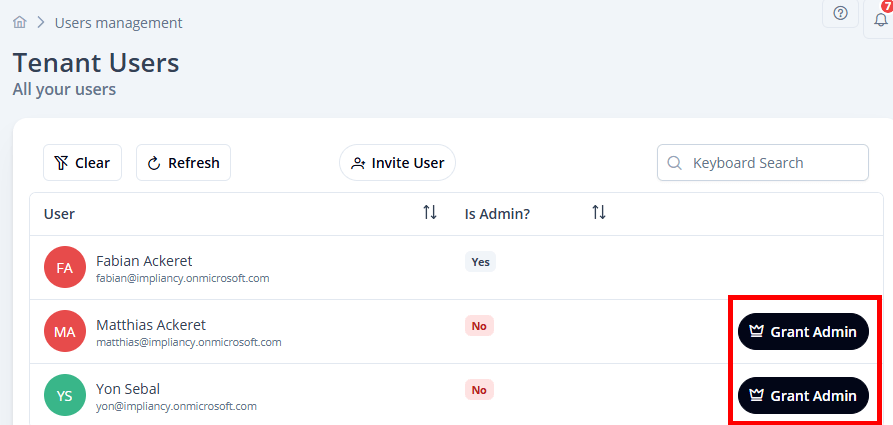
View current admins
In Users Management, you can see:
- All users of the tenant
- Each Impliancy admin is marked accordingly
- Their assigned tenants (if multi tenant mode is used) (upcoming)
Each Impliancy admin has the option to promote any user (admin or non admin) as Impliancy admin by clicking on Grant Admin
What admins can see
Admins have access to:
- All environments
- All artifacts
- All ownership information
- All compliance forms and statuses
- All inactivity settings
- Complete audit logs
- All configuration pages
They do not impersonate users.
All actions are done via the service principal or the authenticated admin account.
Best practices
- Restrict Global Admin and Power Platform Admin roles to essential staff
- Use Service Provider Admins for daily governance work
- Review admin assignments regularly
- Remove access for staff who no longer manage the tenant
Summary
- Admins are determined automatically by tenant roles
- Service Provider Admins can be added manually (upcoming)
- Admins have full governance access for the tenant they manage
- No impersonation is used; all actions are explicit and auditable